Freshbooks Vs Quickbooks Vs Zoho: Ultimate Comparison for 2025
Choosing the right accounting software can be hard. There are many options, but FreshBooks, QuickBooks, and Zoho are popular choices. Each one has its own strong points. This article will help you understand the differences. You will learn what each software offers. Then, you can decide which one fits your needs.
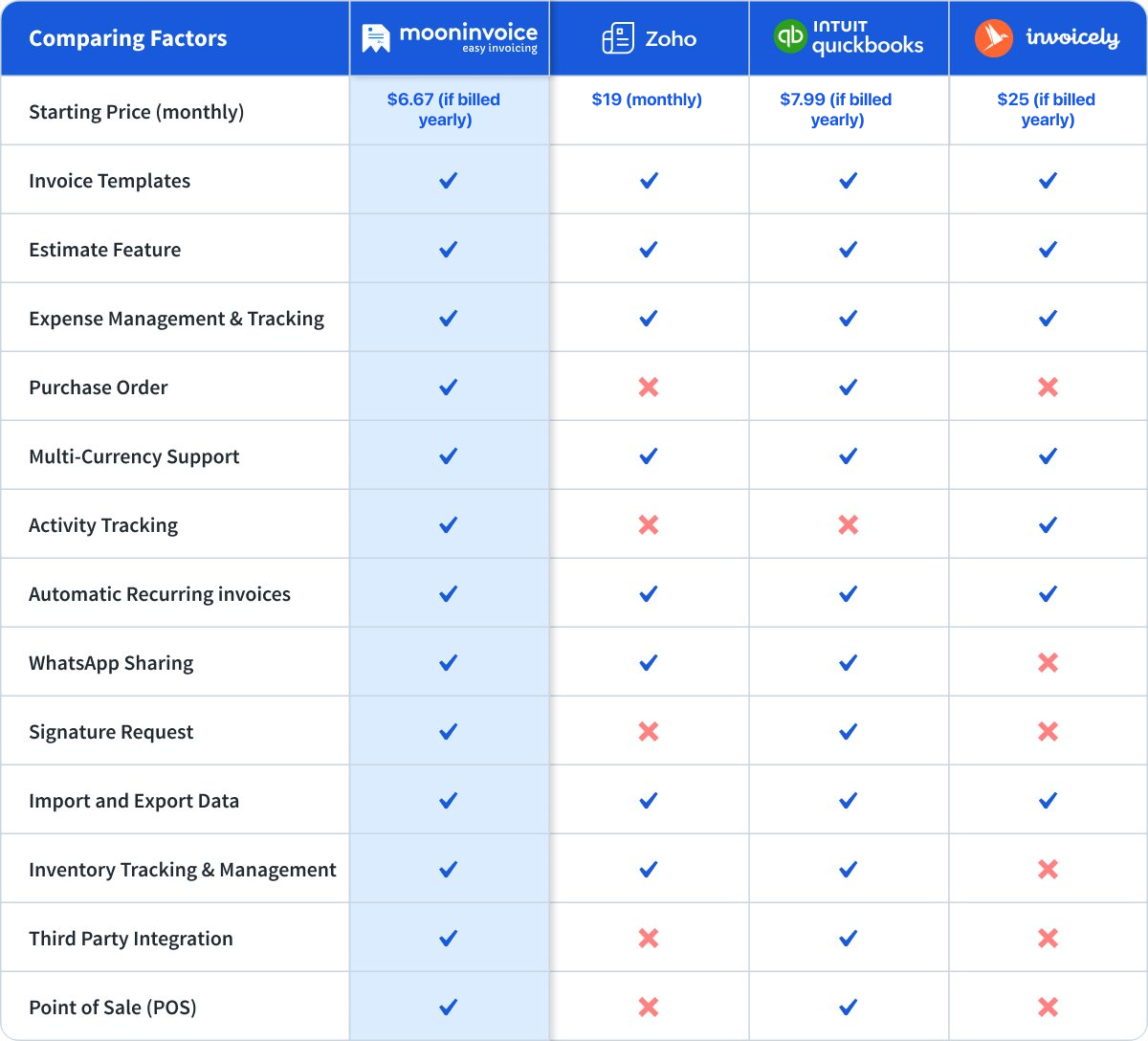
Credit: www.mooninvoice.com
Why Use Accounting Software?
Small business owners and freelancers often need to track money. This includes invoices, bills, and expenses. Doing this by hand takes time. It can cause mistakes. Accounting software helps by making these tasks easier. It saves time and reduces errors. It also helps you see how your business is doing.
Overview of FreshBooks, QuickBooks, and Zoho
Let’s start with a quick look at each software.
Software
Best For
Price Range
Platform
FreshBooks
Small businesses, freelancers
$15 – $50 per month
Web, iOS, Android
QuickBooks
Small to medium businesses
$25 – $150 per month
Web, iOS, Android, Desktop
Zoho Books
Small businesses, startups
$15 – $40 per month
Web, iOS, Android
FreshBooks: Simple and User-Friendly
FreshBooks is easy to use. It is made for people who are not accountants. The design is clear and simple. You can create invoices in minutes. It also helps you track expenses and time.
Expense Tracking: Link your bank and track expenses automatically.
Time Tracking: Track time for projects and bill clients.
Reports: See profit and loss reports easily.
Mobile App: Work on the go with iOS and Android apps.
FreshBooks works well for freelancers and small teams. It makes billing and time tracking easy. However, it has limited advanced accounting features.
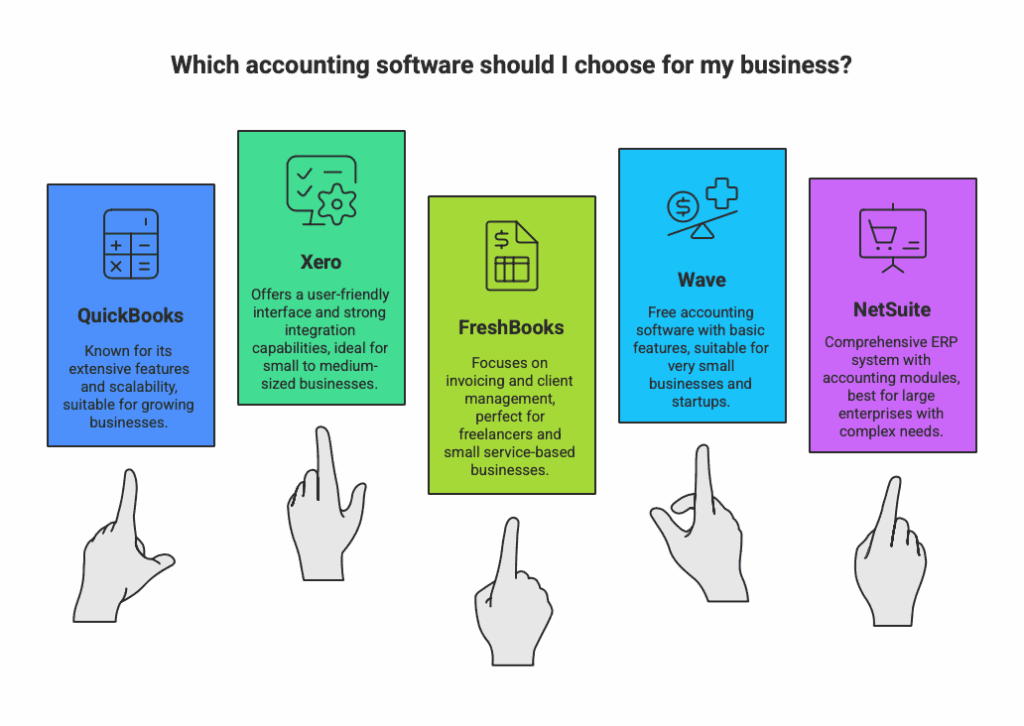
Credit: austinbookkeepinghub.com
QuickBooks: Powerful and Popular
QuickBooks is one of the most used accounting tools. It is good for small and medium businesses. It offers many features for managing money. You can track income, expenses, taxes, and payroll.
Main Features
Invoicing: Customize and send invoices quickly.
Expense Management: Connect bank accounts and track expenses.
Payroll: Pay employees and manage taxes.
Tax Preparation: Generate tax reports for easy filing.
Inventory: Track products and stock levels.
Reports: Detailed financial reports for business health.
QuickBooks offers desktop and cloud options. Its mobile app is strong too. It suits businesses with more complex needs. But, it can be harder to learn for beginners.
Zoho Books: Affordable and Flexible
Zoho Books is part of the Zoho business suite. It offers many tools for managing money. It works well for startups and growing businesses. The price is lower compared to QuickBooks.
Main Features
Invoicing: Create and send invoices easily.
Expense Tracking: Keep track of your costs.
Bank Reconciliation: Match bank transactions with your records.
Project Management: Track projects and expenses.
Reports: Get financial and tax reports.
Automation: Automate recurring invoices and reminders.
Zoho Books integrates well with other Zoho apps. This is good if you use Zoho CRM or Zoho Projects. The learning curve is moderate but not too steep.
Comparison Table: FreshBooks Vs QuickBooks Vs Zoho
Feature
FreshBooks
QuickBooks
Zoho Books
Ease of Use
Very easy
Moderate
Moderate
Invoicing
Strong
Strong
Strong
Expense Tracking
Good
Excellent
Good
Payroll
No
Yes
No
Inventory Management
No
Yes
Basic
Mobile App
Yes
Yes
Yes
Price (Starting)
$15/month
$25/month
$15/month
Best For
Freelancers, small teams
Small to medium businesses
Small businesses, startups
Which Software Should You Choose?
It depends on your needs and budget.
Choose Freshbooks If:
You want simple and clear software.
You are a freelancer or small team.
You need easy time tracking and invoicing.
Choose Quickbooks If:
Your business is growing or medium-sized.
You need payroll and inventory features.
You want detailed financial reports.
Choose Zoho Books If:
You want affordable software with many features.
You use other Zoho apps.
You want good automation tools.
Things to Consider Before Buying
Before picking software, think about:
Budget: How much can you spend monthly?
Features: What features do you need now and later?
Ease of Use: Are you comfortable learning new software?
Support: Does the company offer good customer help?
Integrations: Does it connect with other tools you use?
How to Get Started
Most software offers free trials. Try them before buying. This lets you see if it fits your work style. You can test invoicing, tracking, and reports. Check the mobile app too.
Take notes during trials. Compare ease of use and features. Ask yourself which software feels right. This helps you make a smart choice.
Frequently Asked Questions
What Are The Main Differences Between Freshbooks, Quickbooks, And Zoho?
Freshbooks focuses on invoicing, Quickbooks on accounting, Zoho offers all-in-one business tools.
Which Software Is Best For Small Business Accounting?
Quickbooks is often preferred for small business accounting due to its strong features.
Can Freshbooks Handle Payroll Services?
Freshbooks does not offer payroll; you need a separate service for that.
Is Zoho Good For Managing Inventory?
Yes, Zoho has inventory management features ideal for small to medium businesses.
Conclusion
FreshBooks, QuickBooks, and Zoho Books all help with accounting. Each suits different types of users. FreshBooks is simple and great for freelancers. QuickBooks is powerful for growing businesses. Zoho Books is flexible and affordable.
Think about what you need most. Then pick the software that fits you. Using the right tool saves time and stress. It helps your business stay organized and healthy.