
If you want to create landing pages for your website, you might have heard about Unbounce, Leadpages, and Instapage. These are popular tools that help you build pages where people can sign up, buy something, or get more information. But which one is best for you? This guide will help you understand their differences and pick the right one.
What Are Landing Page Builders?
Landing page builders are tools that let you make web pages quickly. You do not need to know coding. You can drag and drop elements like text, images, buttons, and forms. These pages are special because they focus on one goal, like getting emails or selling products.
Why Use a Landing Page Builder?
- Easy to make pages without coding skills.
- Helps you test what works best with visitors.
- Can connect with email and marketing tools.
- Saves time and money compared to hiring a designer.
Overview of Unbounce, Leadpages, and Instapage
| Feature | Unbounce | Leadpages | Instapage |
|---|---|---|---|
| Ease of Use | Good, with drag-and-drop builder. | Very easy, simple interface. | Easy, with many templates. |
| Templates | 100+ customizable templates. | 100+ mobile-friendly templates. | 200+ high-quality templates. |
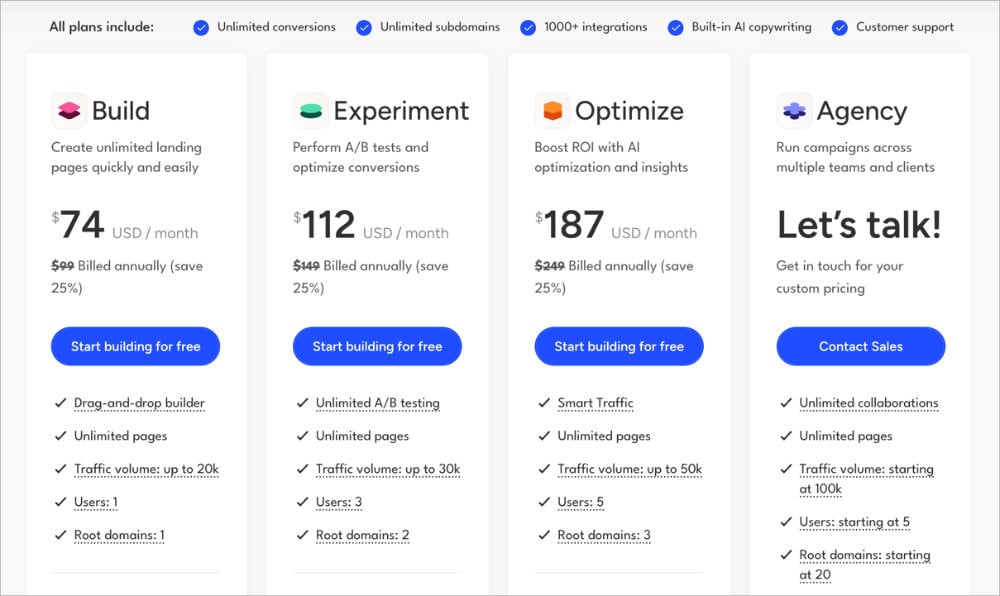
| Pricing (Starting) | $90 per month. | $39 per month. | $199 per month. |
| Best for | Marketers who want control. | Small business and beginners. | Large teams and agencies. |
| Unique Features | Popups, sticky bars, A/B testing. | Built-in payments, alert bars. | Heatmaps, collaboration tools. |
Unbounce: Control and Flexibility
Unbounce is a popular choice for marketers who want more control. It has a drag-and-drop editor that lets you build pages easily. You can add popups and sticky bars to get visitor attention. It also supports A/B testing, so you can check which page works better.
Pros Of Unbounce
- Flexible editor with many options.
- Good for experienced users.
- Supports popups and sticky bars.
- Strong A/B testing tools.
Cons Of Unbounce
- More expensive than others.
- Can be hard for beginners.
- No built-in payment system.
Credit: grooic.com
Leadpages: Simple and Affordable
Leadpages is easy to use and made for beginners. It has many templates that work well on phones and computers. You can connect it with email tools and even accept payments through Stripe. The price is lower than Unbounce and Instapage.
Pros Of Leadpages
- Simple drag-and-drop builder.
- Works well for small businesses.
- Includes payment option.
- Affordable pricing plans.
Cons Of Leadpages
- Less flexible design options.
- Limited A/B testing on basic plans.
- Fewer advanced marketing features.
Instapage: Designed for Teams and Agencies
Instapage is great if you work with a team. It has many templates and a powerful editor. You can also use heatmaps to see where visitors click. Collaboration tools let many people work on pages together. It is the most expensive option but has many features.
Pros Of Instapage
- More than 200 templates to choose from.
- Heatmaps show visitor behavior.
- Good collaboration tools.
- Strong integration with other tools.
Cons Of Instapage
- Highest price among the three.
- May be too complex for beginners.
- No built-in payment system.
Comparing Key Features
1. Ease Of Use
Leadpages is the easiest to use. It has a simple layout and clear steps. Unbounce is good but needs some learning. Instapage is easy but has many features that can confuse beginners.
2. Templates And Design
Instapage offers the most templates and the best design quality. Unbounce also has many options and more flexibility. Leadpages has good templates but fewer design choices.
3. Testing And Analytics
Unbounce and Instapage have strong A/B testing tools. Instapage also shows heatmaps. Leadpages offers A/B testing only in higher plans.
4. Pricing
Leadpages is the cheapest to start. Unbounce costs more, but you get more control. Instapage is the most expensive, aimed at big teams.
5. Marketing Features
Unbounce has popups and sticky bars to catch attention. Leadpages allows payments and alert bars. Instapage focuses on collaboration and deep analysis.
Which One Should You Choose?
The answer depends on your needs. Here are some examples:
- If you are new and want simple pages, Leadpages is best.
- If you want more control and testing, go with Unbounce.
- If you work with a team or agency, Instapage fits well.
- If budget is tight, Leadpages is more affordable.
- If design flexibility matters, Unbounce or Instapage are better.
Credit: www.seedprod.com
Final Thoughts
All three tools help you build landing pages without coding. Each has strengths and weaknesses. Think about what matters most to you. Is it price, ease, or features? Also, try free trials if available. This will help you see which tool feels right.
Landing pages are key for online marketing. The right builder makes your work easier. Choose Unbounce, Leadpages, or Instapage based on your needs. Your visitors will thank you with more sign-ups and sales.
Frequently Asked Questions
What Is The Main Difference Between Unbounce, Leadpages, And Instapage?
Unbounce focuses on customization, Leadpages on ease, and Instapage on collaboration.
Which Platform Offers The Best Landing Page Templates?
Leadpages offers a wide variety of easy-to-use templates for quick setup.
Can I Use These Tools Without Coding Skills?
Yes, all three platforms provide drag-and-drop editors for non-coders.
How Do These Tools Compare In Pricing Plans?
Leadpages is usually cheaper; Instapage is pricier but offers more features.


