
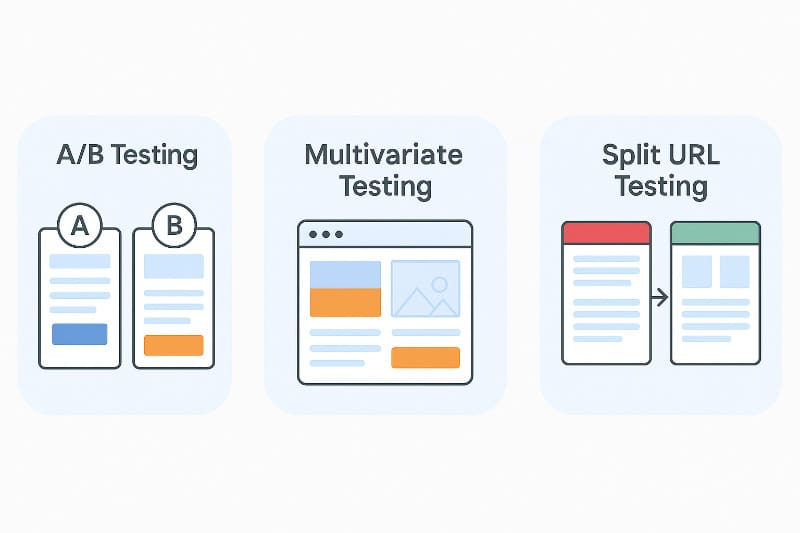
When you want to make your website better, split testing helps a lot. Split testing means you show two or more versions of a page to visitors. Then, you see which one works best. This way, you can pick the page that brings more clicks or sales.
Landing pages are very important. They are the first page visitors see after clicking a link. If the landing page is good, visitors stay longer and take action. If it is bad, they leave fast. So, split testing landing pages is smart.
But how do you split test? You need special tools. These tools help you make different versions of your page. They also show the pages to visitors and collect data. Then, they tell you which page is better.
What Are Split Testing Tools?
Split testing tools are software or apps. They help you create and test different pages. You can change colors, words, pictures, buttons, and more. Then, the tool shows different versions to visitors. It tracks what visitors do.
After some time, the tool tells you which version got more clicks, sign-ups, or sales. This helps you choose the best landing page. You do not guess. You know what works.
Why Use Split Testing Tools?
- Save time: The tool does testing and data tracking for you.
- Easy to use: You can create tests without coding skills.
- Better results: You find the best page version faster.
- Data-driven: You make decisions based on real visitor actions.
Top Tools for Split Testing Landing Pages
Here are some popular tools you can try for split testing landing pages. Each tool has its own features and pricing. Choose the one that fits your needs and budget.
| Tool Name | Main Features | Ease of Use | Price Range |
|---|---|---|---|
| Google Optimize | Free, easy setup, integrates with Google Analytics | Beginner-friendly | Free and paid plans |
| Optimizely | Advanced targeting, multivariate testing, real-time results | Medium learning curve | Starts at moderate price |
| VWO (Visual Website Optimizer) | Visual editor, heatmaps, visitor recordings | Easy for beginners | Medium to high |
| Unbounce | Drag-and-drop builder, A/B testing, templates | Very easy | Moderate |
| Convert | Privacy focused, A/B and multivariate tests, integrations | Medium | Moderate |
| HubSpot | All-in-one marketing, easy split testing, analytics | Easy | High |
How to Choose the Right Tool?
Choosing the right tool depends on your goals and skills. Here are some things to think about:
- Your budget: Some tools cost more than others.
- Your experience: Beginners may want easy tools.
- Features you need: Do you want simple A/B tests or more advanced options?
- Support and help: Good support can save time.
- Integration: Does the tool work with your current website or software?

Credit: blog.uxtweak.com
How to Use Split Testing Tools
Using split testing tools is simple. Follow these steps:
- Pick the page to test: Choose your landing page.
- Create variations: Make changes like button color or headline.
- Set goals: Decide what you want to track (clicks, sign-ups).
- Launch the test: Start showing different versions to visitors.
- Collect data: Wait for enough visitors to see the pages.
- Analyze results: See which version did better.
- Pick the winner: Use the best page for all visitors.
Tips for Successful Split Testing
- Test one thing at a time: Change one element only.
- Be patient: Wait long enough to get clear results.
- Use clear goals: Know what you want to improve.
- Keep it simple: Simple changes can bring big results.
- Repeat tests: Test again to improve further.
Credit: absplittest.com
Common Elements to Test on Landing Pages
Here are some parts of your landing page you can test:
- Headlines: Try different words or lengths.
- Call-to-action buttons: Change color, size, text.
- Images: Use different photos or illustrations.
- Forms: Test shorter or longer forms.
- Page layout: Move elements around.
- Colors: Try different background or text colors.
Benefits of Split Testing Your Landing Pages
Split testing helps you understand your visitors better. It shows what they like and what they ignore. This leads to:
- More clicks: Visitors are more likely to click buttons.
- More sign-ups: Visitors fill out forms more often.
- More sales: Visitors buy products or services.
- Better user experience: Your page is easier and nicer to use.
- Reduced bounce rate: Visitors stay longer on your site.
Frequently Asked Questions
What Is Split Testing For Landing Pages?
Split testing compares two versions of a landing page to see which performs better.
Which Tools Are Best For Split Testing Landing Pages?
Popular tools include Google Optimize, Optimizely, and VWO for easy split testing.
How Does Split Testing Improve Landing Page Conversion Rates?
It finds the best design by testing different elements to boost visitor actions.
Can I Run Split Tests Without Coding Skills?
Yes, many tools offer easy drag-and-drop editors for non-coders.
Conclusion
Split testing landing pages is a smart way to improve your website. Using the right tools makes the process easier. Tools like Google Optimize, Optimizely, and Unbounce help create tests and track data.
Start with simple tests. Change one part at a time. Watch which version works best. Use the winning page to get more visitors and customers.
Remember, good tools and clear goals make split testing useful. Take your time. Test often. Your landing pages will get better step by step.


