
Last updated: September 2025 • Reading time: ~8 min
Tracking performance across Instagram, TikTok, LinkedIn, or email-linked campaigns is no longer optional. With the right social media analytics tools free, small businesses can measure engagement, spot trends, and save money without costly subscriptions. This guide compares the best free and trial-based tools available in 2025, helping you determine which one fits your workflow.
Quick Picks (TL;DR)
- Best Overall Free Tool: Buffer Free Plan – simple scheduling with basic analytics.
- Best for Small Business: Zoho Social Free – integrates social + CRM data.
- Best Free Trial Option: Sprout Social (30-day trial) – enterprise-level reporting.
- Best for Visual Content: Later Free Plan – Instagram and TikTok insights.
- Best Budget-Friendly Upgrade: Metricool Freemium – cross-platform analytics + ads tracking.
- Best Complementary Tool: Google Analytics 4 – track social referral traffic to websites.
Table of Contents
- Why Analytics Tools Matter in 2025
- Buffer Free Plan
- Zoho Social Free
- Sprout Social (Free Trial)
- Later Free Plan
- Metricool Freemium
- Google Analytics 4
- Comparison Table
- Checklist: How to Choose a Free Tool
- Methodology & Sources
- Key Takeaways
- FAQs
- Recommended Reads & Tools
- Conclusion
Why Analytics Tools Matter in 2025
Social platforms are busier and more algorithm-driven than ever. For small businesses, relying only on likes or impressions gives a partial picture. Social media analytics tools free help answer critical questions:
- Which posts bring actual website clicks or email sign-ups?
- What times generate the best engagement?
- Which campaigns deliver the best return on time or money?
According to Statista (2024), over 90% of marketers use analytics dashboards to guide campaigns. Without tracking, small businesses risk spending hours on content that doesn’t convert.
Buffer Free Plan
Why it stands out:
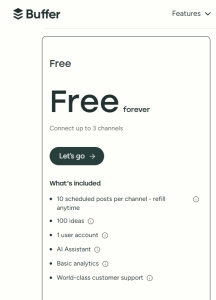
Buffer’s free plan is a go-to for beginners. It combines post scheduling with light analytics, letting you measure reach and engagement across three channels.
Pros:
- Easy to set up and use.
- Supports scheduling for 10 posts per channel.
- Tracks likes, comments, and clicks.
Cons:
- Limited to 3 social accounts.
- Analytics are basic compared to paid plans.
Pricing: Free (paid upgrades from $6/month).
When to pick:
- If you’re a freelancer or a small shop with a few channels.
When to skip:
- If you need advanced reporting or manage more than three accounts.
Alternatives:
- Zoho Social Free for CRM integration.
- Later Free Plan for Instagram/TikTok focus.
Zoho Social Free
Why it stands out:
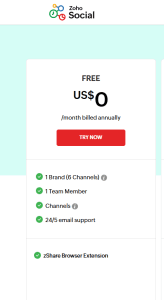
Zoho Social’s free version is perfect for small businesses already using Zoho CRM or Zoho Mail. It connects social performance directly with customer engagement.
Pros:
- Seamless integration with Zoho CRM.
- Real-time monitoring dashboard.
- Team collaboration features, even on free tier.
Cons:
- Limits analytics depth.
- Focused mostly on Facebook, Twitter, LinkedIn.
Pricing: Free for 1 brand (paid from $10/month).
When to pick:
- If you already use Zoho apps for business and email.
When to skip:
- If your focus is TikTok, Instagram, or Pinterest.
Alternatives:
- Buffer for easier scheduling.
- Metricool for wider coverage.
Sprout Social (Free Trial)
Why it stands out:
Sprout Social offers a full-featured 30-day free trial. It’s built for agencies and larger teams needing advanced reports.
Pros:
- Enterprise-grade analytics across all major networks.
- Detailed competitor benchmarking.
- Integration with email and customer care platforms.
Cons:
- Trial ends after 30 days.
- Pricing starts high at $249/month.
Pricing: Free trial → Paid from $249/month.
When to pick:
- If you want to test professional-grade analytics before investing.
When to skip:
- If you need a long-term free option.
Alternatives:
- Metricool (cheaper freemium).
- Zoho Social Free (for ongoing free use).
Later Free Plan
Why it stands out:
Later is excellent for visual-first platforms. Its free plan supports Instagram, TikTok, and Pinterest scheduling with analytics.
Pros:
- Visual planner for Instagram grids.
- TikTok scheduling and metrics.
- Linkin.bio to track website traffic from posts.
Cons:
- Limited to 30 posts per month.
- Best for visuals, less useful for text-heavy networks.
Pricing: Free (upgrades from $18/month).
When to pick:
- If you’re a creator-focused business with visual content.
When to skip:
- If your strategy relies on Twitter or LinkedIn.
Alternatives:
- Buffer Free for general scheduling.
- Metricool for more cross-platform insights.
Metricool Freemium
Why it stands out:
Metricool offers a freemium plan with cross-platform analytics and even ad tracking (Google, Facebook, TikTok).
Pros:
- Integrates paid ad tracking with organic analytics.
- Strong competitor comparison tools.
- Supports unlimited scheduled posts with limits per month.
Cons:
- Free plan limited to 1 brand.
- Advanced reports locked behind paid tier.
Pricing: Free (upgrades from $18/month).
When to pick:
- If you run ads and want unified reporting.
When to skip:
- If you need multiple brands/accounts under free tier.
Alternatives:
- Sprout Social trial for more detail.
- Google Analytics for website conversions.
Google Analytics 4
Why it stands out:
Though not a pure social tool, GA4 tracks social traffic and conversions once visitors hit your website. It pairs well with other analytics tools.
Pros:
- Free forever.
- Tracks referrals from all social platforms.
- Links performance to website sales or sign-ups.
Cons:
- Steeper learning curve.
- Doesn’t show post-level insights directly.
Pricing: Free.
When to pick:
- If your goal is driving email sign-ups, sales, or website clicks.
When to skip:
- If you only need in-platform engagement metrics.
Alternatives:
- Metricool for combined ad + social data.
- Buffer Free for lightweight insights.
Comparison Table
| Tool | Best For | Free/Freemium | Free Trial | Paid From | Key Limitation |
| Buffer Free | Simple scheduling | ✅ Yes | ❌ No | $6/mo | Only 3 accounts |
| Zoho Social Free | Small business + CRM | ✅ Yes | ❌ No | $10/mo | Limited networks |
| Sprout Social | Enterprise analytics | ❌ No | ✅ 30 days | $249/mo | Expensive after trial |
| Later Free | Visual content | ✅ Yes | ❌ No | $18/mo | 30 posts/month |
| Metricool Free | Ads + organic | ✅ Yes | ❌ No | $18/mo | 1 brand only |
| GA4 | Website conversions | ✅ Yes | ❌ N/A | Free | Steep learning curve |
Checklist: How to Choose a Free Tool
- Define your goal — Engagement? Website traffic? Email sign-ups?
- Check platform support — Instagram, LinkedIn, TikTok, or all?
- Test usability — Sign up for free or trial and explore.
- Look at integrations — CRM, ads, email tools matter for growth.
- Plan for scaling — Can you afford the paid plan if you grow?
Methodology & Sources
We selected tools based on:
- Accuracy: Do they show verified, reliable analytics?
- Integrations: CRM, ads, email platforms for small businesses.
- Cost: Free plans or transparent trial offers.
- Ease of Use: Clear dashboards for beginners and advanced users.
- Support: Tutorials, help docs, and community backing.
Sources:
- Statista (2024): Over 90% of marketers use analytics dashboards.
- Official vendor pages (Buffer, Zoho, Sprout Social, Later, Metricool, Google).
- Pew Research: Social media usage among small businesses.
Key Takeaways
- Social media analytics tools free let you measure impact without big budgets.
- Buffer and Later excel at scheduling + lightweight analytics.
- Zoho Social ties analytics to CRM, great for small business.
- Sprout Social’s trial is best to test enterprise-grade reporting.
- Metricool bridges organic and paid campaign tracking.
- GA4 is essential for linking social performance to website/email conversions.
FAQs
Q1: What is the best free social media analytics tool?
A: Buffer Free is the easiest for small teams, while GA4 is essential for tracking website traffic.
Q2: Are free tools enough for small businesses?
A: Yes, if you run 1–3 channels. For multi-brand campaigns, trials or paid tiers help.
Q3: Do these tools track email campaigns too?
A: Not directly, but Zoho Social and GA4 integrate with email marketing platforms.
Q4: What happens after a free trial ends?
A: Tools like Sprout Social lock features until you subscribe. Always export reports first.
Q5: Which tool helps with TikTok analytics?
A: Later Free and Metricool both support TikTok insights on free plans.
Conclusion + Soft CTA
Free and trial-based analytics tools give small businesses a real advantage in 2025. Whether you need to track Instagram growth, TikTok engagement, or email-driven conversions, there’s a tool to match.
Recommended Reads & Tools
- Social Media Analytics: Effective Tools for Building, Interpreting, and Using Metrics – Buy on Amazon
- Measure What Matters by Katie Delahaye Paine – Buy on Amazon
- The Art of Social Media by Guy Kawasaki – Buy on Amazon


