

Are you struggling to find the right keywords that can boost your website traffic and grow your business? Keyword research can feel overwhelming, but with Semrush, it doesn’t have to be.
This step-by-step guide will show you exactly how to use Semrush to uncover powerful keywords that attract your ideal audience. By the end, you’ll have a clear plan to improve your SEO and get ahead of your competitors. Ready to unlock the secrets to smarter keyword research?
Let’s dive in.
Credit: explodingtopics.com
Why Keyword Research Matters
Keyword research is the foundation of any successful online content strategy. It helps to find the exact words people type into search engines. These words show what users want to know or buy. Using the right keywords can bring more visitors to your website.
Without proper keyword research, content may not reach the right audience. This means less traffic and fewer chances to grow your business. Understanding keywords helps create content that matches what people search for.
What Is Keyword Research?
Keyword research means finding popular words and phrases related to your topic. These keywords reflect what users type in search engines. This process guides content creation and marketing efforts. It ensures your content answers real questions people ask.
How Keyword Research Improves Seo
Search engines rank pages by relevance and quality. Keywords help search engines understand your content. Using the right keywords can improve your ranking in search results. Higher rankings lead to more clicks and visitors.
Why Keywords Matter For Content Strategy
Keywords show the needs and interests of your audience. They guide what topics to cover and how to write. Content tailored to keywords attracts readers and keeps them engaged. This builds trust and encourages return visits.
Getting Started With Semrush
Starting with Semrush is simple and clear. This tool helps find the best keywords for your website. It gives data on search volume, competition, and trends. Using it right can improve your site’s visibility and traffic.
This section guides you through the first steps. It covers creating an account and exploring the dashboard. These basics will help you use Semrush with confidence.
Creating An Account
Visit the Semrush website to begin. Click on the sign-up button at the top right. Enter your email address and create a strong password. You can also sign up using Google or Facebook for faster access.
After signing up, check your email for a confirmation message. Click the link inside to verify your account. Once done, log in to start exploring Semrush’s features.
Navigating The Dashboard
The dashboard is the main control panel. It shows key tools and reports in one place. On the left, find the menu with options like Keyword Overview, Domain Analytics, and Projects.
The center area displays search bars and recent reports. Use the search bar to enter keywords or domains. The top right corner has your profile and settings.
Spend time exploring each section. This helps you understand where to find important data. Getting familiar with the dashboard speeds up your keyword research process.
Finding The Right Keywords
Finding the right keywords is a crucial step in SEO. It helps your content reach the right audience. Picking good keywords can increase website traffic and improve rankings. Using SEMrush tools makes this process easier and more effective. Let’s explore how to find the best keywords for your content.
Using Keyword Overview
The Keyword Overview tool gives a quick summary of any keyword. Enter a keyword to see search volume, trends, and competition. It shows related keywords and their metrics. This helps you understand if the keyword suits your content goals. Use this tool to decide which keywords to target first.
Exploring Keyword Magic Tool
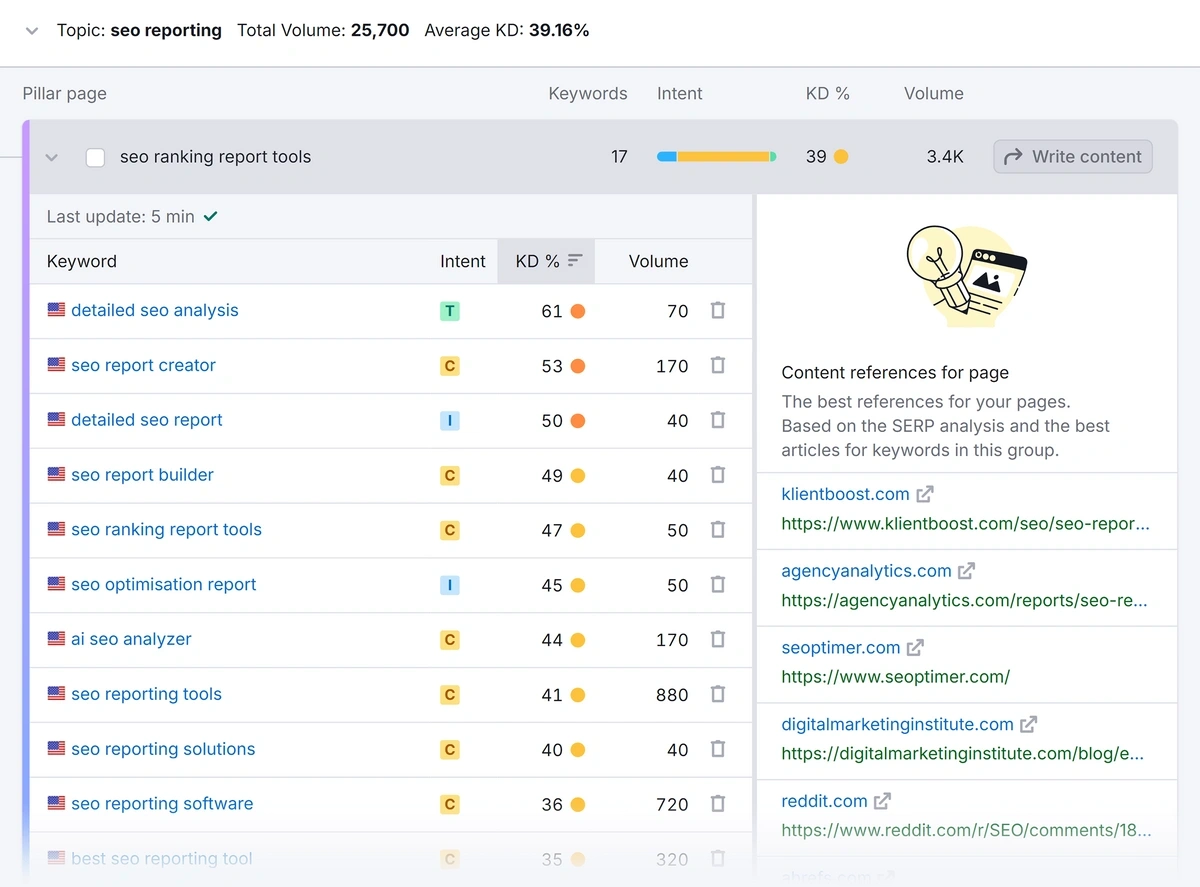
The Keyword Magic Tool offers a large list of keyword ideas. It groups keywords by topic and intent. You can filter results by volume, difficulty, and word count. This tool helps find long-tail keywords with less competition. It is perfect for building a strong keyword list.
Analyzing Keyword Difficulty
Keyword Difficulty shows how hard it is to rank for a keyword. SEMrush assigns a score from 0 to 100. Lower scores mean easier ranking opportunities. Check this score before choosing keywords. Focus on keywords with good traffic but low difficulty to improve SEO results.
Credit: explodingtopics.com
Analyzing Competitors’ Keywords
Analyzing competitors’ keywords helps you understand which terms bring visitors to their sites. This insight guides your own keyword choices. Using Semrush, you can easily find the keywords your competitors rank for. This strategy helps you find gaps and new opportunities. It also reveals trends in your niche that you might miss otherwise.
Identifying Top Competitors
Start by entering your website or main keywords into Semrush. The tool shows your top competitors in search results. These are sites that rank for similar keywords. Focus on competitors with strong online presence. They set the benchmark for your keyword strategy. Save the list for deeper analysis in the next step.
Examining Competitor Keyword Strategies
Use Semrush to explore each competitor’s keyword data. Look at their organic and paid keywords. Notice the keywords that bring the most traffic. Check the keyword difficulty score to find achievable targets. Identify keywords your competitors rank for but you do not. These could be valuable additions to your content. Observe their use of long-tail keywords. These often have lower competition and high intent. This analysis helps you plan your own keyword list with precision.
Organizing Keywords For Campaigns
Organizing keywords is a key step in building effective campaigns. It helps to focus on specific goals and reach the right audience. Well-organized keywords save time and improve ad performance. Semrush offers tools to group and manage keywords easily. This section explains how to organize keywords for your campaigns.
Grouping Keywords By Intent
Grouping keywords by intent sorts them by the user’s goal. Intent can be informational, navigational, or transactional. Informational keywords target users seeking knowledge. Navigational keywords focus on finding a brand or site. Transactional keywords aim at buying or converting.
Use Semrush to analyze keyword intent quickly. Grouping by intent helps create targeted ads. It improves relevance and user engagement. Campaigns with clear intent groups perform better. This method guides your message and budget effectively.
Creating Keyword Lists
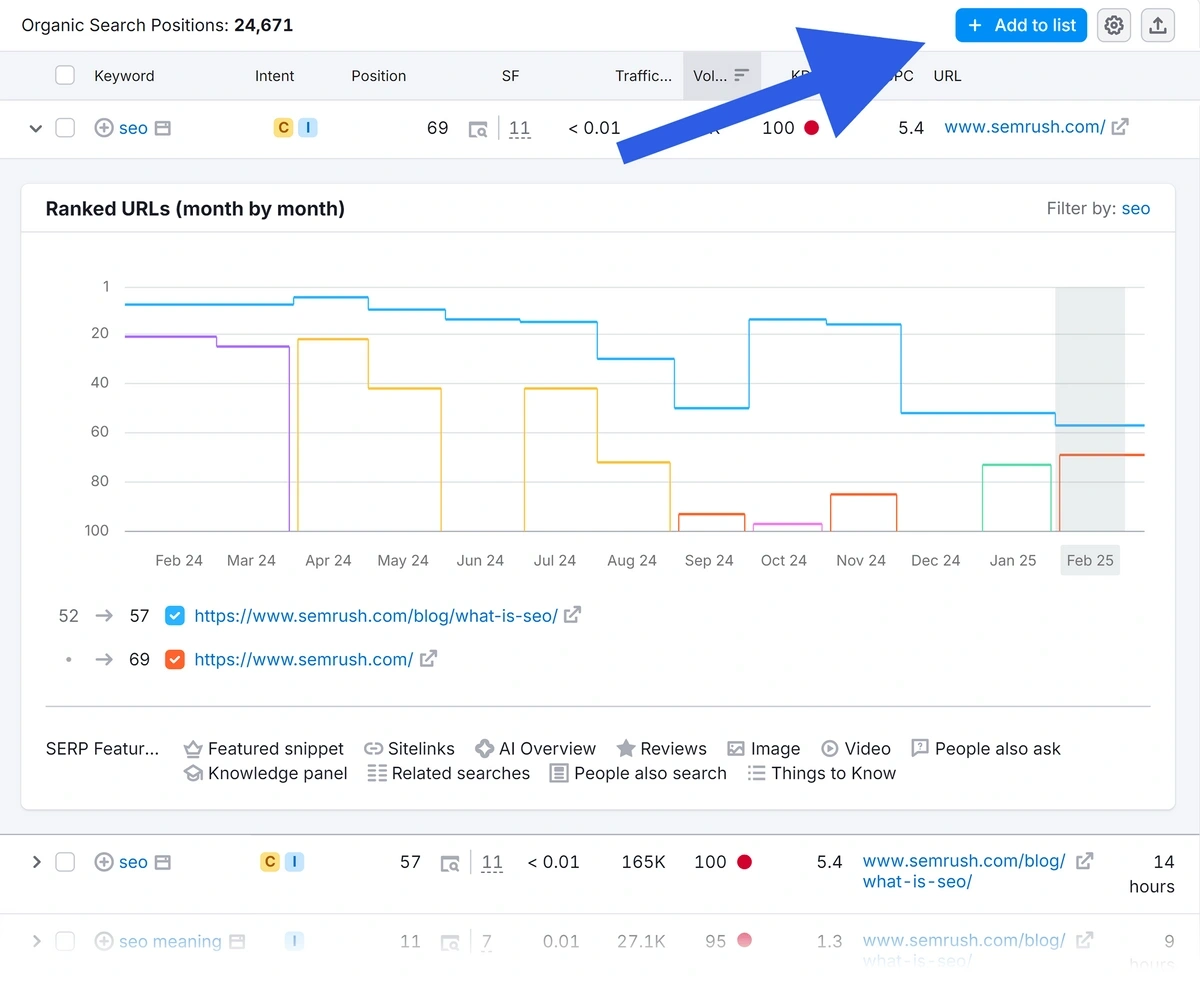
Creating keyword lists in Semrush organizes your research. Lists keep keywords neat and easy to access. You can create lists for topics, products, or campaigns.
Start by adding keywords from your research to a list. Name the list clearly for quick identification. Use lists to share keywords with your team. Lists also help track performance and update keywords regularly.
Tracking Keyword Performance
Tracking keyword performance is vital for SEO success. It shows how your chosen keywords rank over time. Monitoring helps spot trends and adjust strategies quickly. SEMrush offers tools that simplify this process for any website.
Setting Up Position Tracking
Start by entering your website domain and target keywords in SEMrush. Choose the device type and location for accurate tracking. The tool collects data daily and updates your keyword positions. This setup gives a clear view of where your keywords stand.
Interpreting The Results
Look at keyword rankings to see progress or decline. Focus on keywords that improve or drop significantly. Analyze traffic changes linked to these keywords. Use data to decide which keywords need more work or new content.
Advanced Tips For Keyword Research
Advanced keyword research helps find better opportunities for your content. It goes beyond basic searches and explores detailed data. This approach saves time and increases your chances of ranking higher.
Using Semrush’s advanced features lets you filter and target keywords precisely. It helps discover relevant terms that might be missed otherwise. These tips improve your strategy and make your work more efficient.
Using Filters Effectively
Filters narrow down large keyword lists quickly. Set filters for search volume, keyword difficulty, and cost per click. Focus on keywords with medium difficulty and good volume for best results. Exclude irrelevant terms to keep your list clean.
Leveraging Related Keywords
Related keywords show terms connected to your main keyword. Use Semrush to find these ideas and expand your list. They help cover more topics and reach wider audiences. Look for synonyms and variations to diversify your content.
Incorporating Long-tail Keywords
Long-tail keywords have more words and less competition. They attract visitors who search with specific phrases. Semrush helps identify long-tail terms that match your niche. Include them in your content to improve search relevance and conversions.
.png)
Credit: www.semrush.com
Common Mistakes To Avoid
Keyword research with Semrush is a powerful way to improve your SEO. Many make simple mistakes that waste time and effort. Avoiding these errors helps you get better results faster.
Understanding common pitfalls guides you to smarter keyword choices. Keep your research clear and focused. This section shows key mistakes and how to avoid them.
Using Broad Keywords Without Focus
Choosing very broad keywords can lead to too much competition. These keywords are hard to rank for. Instead, pick keywords that are specific and relevant to your content.
Ignoring Search Intent
Not considering what users want hurts your SEO. Keywords must match the user’s goal, like buying or learning. Always check if the keyword fits your page’s purpose.
Relying Only On High Search Volume
High search volume looks good but can be misleading. These keywords are often very competitive. Balance volume with keyword difficulty and relevance for best results.
Skipping Competitor Analysis
Ignoring what competitors do is a big mistake. Semrush helps you see competitor keywords and strategies. Use this data to find gaps and opportunities in your niche.
Not Using Filters Properly
Semrush has many filters to narrow your keyword list. Not using them leads to irrelevant or low-quality keywords. Apply filters for country, language, and difficulty to refine results.
Frequently Asked Questions
What Is Semrush Keyword Research Tool?
Semrush is a powerful SEO tool that helps find relevant keywords. It provides search volume, competition, and trends data. Users can identify profitable keywords to improve website rankings and traffic.
How To Start Keyword Research With Semrush?
Begin by entering a seed keyword in Semrush’s Keyword Overview tool. Analyze related keywords, search volume, and difficulty. Use filters to refine results and export the best keywords for your content strategy.
Can Semrush Find Competitor Keywords?
Yes, Semrush allows users to analyze competitor domains. It reveals their top-performing keywords and traffic sources. This insight helps you identify keyword gaps and improve your SEO strategy.
How To Use Semrush For Long-tail Keywords?
Use the Keyword Magic Tool to discover long-tail keywords. Filter by phrase match or questions for specific ideas. Long-tail keywords have lower competition and higher conversion potential.
Conclusion
Keyword research with Semrush helps find the best words for your content. Follow each step carefully for good results. Use the tools to check search volume and competition. Choose keywords that fit your audience and goals. Keep updating your list to stay relevant.
Consistent research improves your website’s visibility. Start small, learn, and grow your SEO skills. This guide makes keyword research easier and clearer. Keep practicing to see steady progress in your rankings.


