
If you want to stay ahead in your market, knowing what your competitors are doing is key. But how do you uncover their strategies without guessing?
That’s where Semrush comes in. This powerful tool gives you clear insights into your competitors’ online moves—like which keywords they target, where their traffic comes from, and how they rank. By learning how to use Semrush for competitor research, you can make smarter decisions and grow your business faster.
Keep reading, and you’ll discover simple steps to turn data into your secret weapon.
Credit: www.semrush.com
Setting Up Semrush
Setting up Semrush is the first step to effective competitor research. The tool offers many options, but starting right makes the process smooth. Follow clear steps to create your account, explore the dashboard, and set your project details.
Creating An Account
Visit the Semrush website and click the sign-up button. Use your email or sign up with Google or Facebook. Choose a strong password. Verify your email to activate the account. The process takes only a few minutes. A free trial is available for new users. This lets you explore basic features before paying.
Navigating The Dashboard
After logging in, you land on the dashboard. It shows key tools and reports. The left menu lists options like Domain Overview, Keyword Research, and Projects. Each section helps analyze competitors differently. Use the search bar to enter competitor domains. The dashboard updates with data quickly. Spend some time clicking around to get familiar.
Configuring Project Settings
Create a new project by adding your website domain. Name your project to keep things organized. Set your target location and device type for accurate data. Connect Google Analytics and Search Console accounts if available. These links improve data accuracy. Choose which tools to activate, like Position Tracking or Site Audit. Save the settings to start gathering insights.
Credit: www.semrush.com
Identifying Competitors
Identifying competitors is the first step in effective competitor research. Knowing who competes with you helps shape your marketing strategy. It shows what works in your industry and where you can improve. Semrush offers simple tools to find these competitors quickly. This section explains how to use Semrush to identify your top competitors.
Using Domain Overview
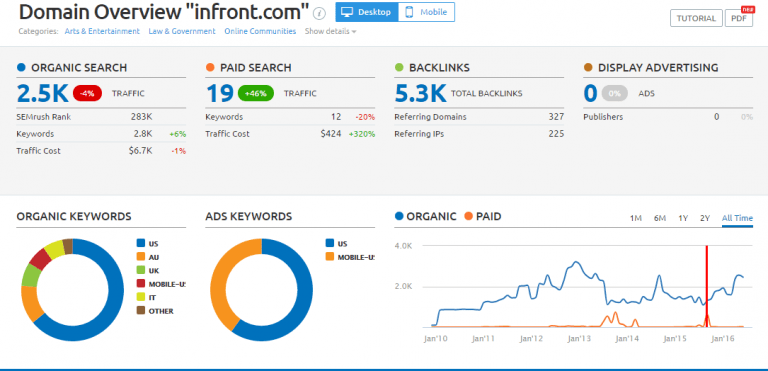
Start with the Domain Overview tool. Enter your website’s URL. Semrush will show a summary of your site’s traffic and keywords. Scroll down to see a list of competitors. These sites have similar traffic or keywords. This gives a clear picture of businesses in your space. It helps you find direct and indirect competitors easily.
Finding Organic Competitors
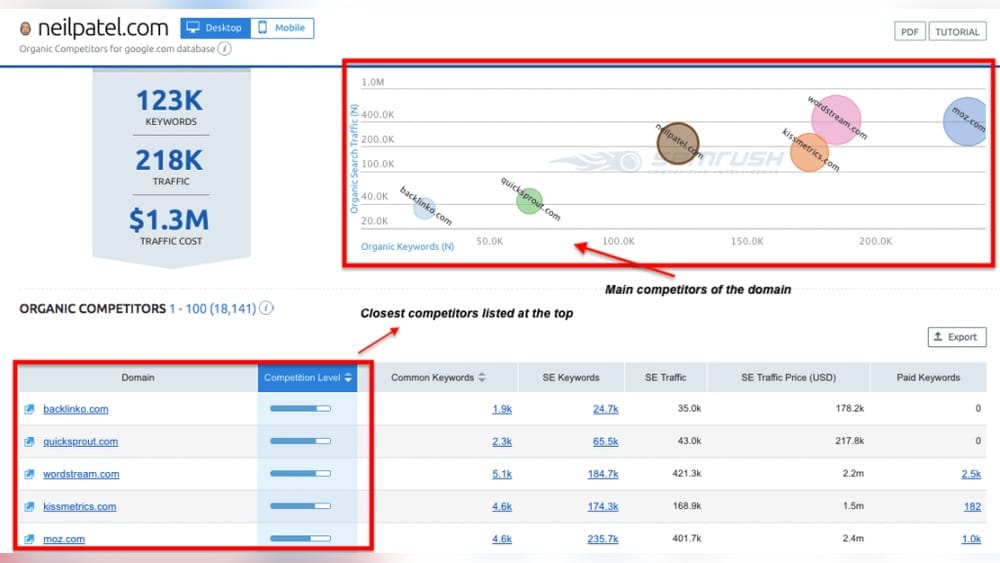
Next, explore the Organic Competitors report. This shows websites that rank for the same keywords as you. It focuses on unpaid search results. You can see which sites appear on Google for your target terms. This reveals who fights for the same audience. Use this data to find competitors you may not know about.
Exploring Paid Competitors
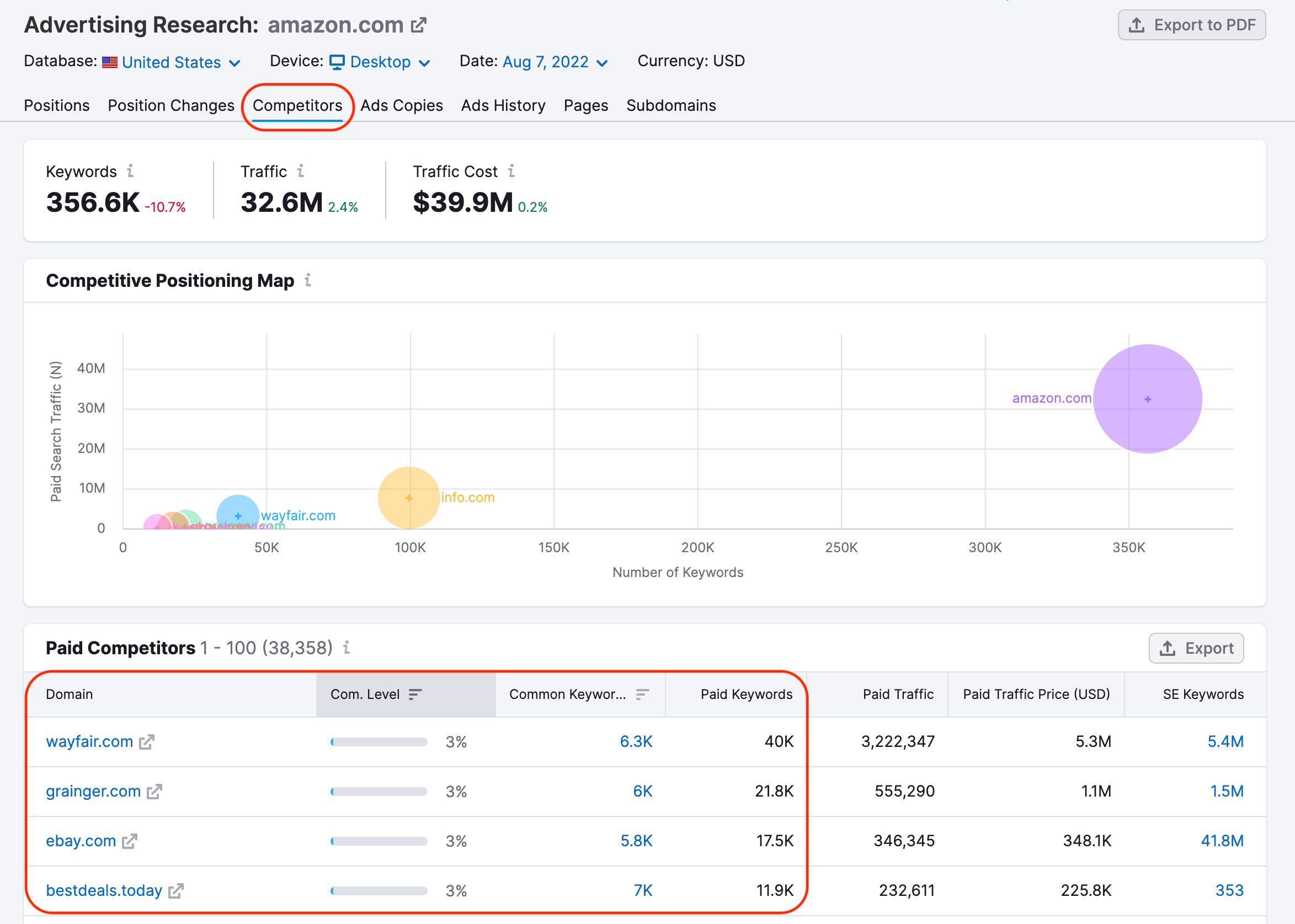
Check the Paid Competitors section to see who advertises for your keywords. These competitors use Google Ads or other paid campaigns. Knowing who invests in paid search helps with budgeting. It also shows aggressive competitors in your market. This insight guides decisions on bidding and ad copy strategies.
Analyzing Competitor Keywords
Analyzing competitor keywords is a key step in SEO research. It helps you find terms that bring traffic to your rivals. This insight guides your own keyword strategy. You discover gaps and opportunities to improve your site’s rank.
SEMrush offers tools to explore competitor keywords easily. These tools show what keywords your competitors use in organic and paid search. They help you compare and learn from their success.
Keyword Gap Tool
The Keyword Gap Tool compares your site’s keywords with competitors’. It shows keywords they rank for but you don’t. This helps find new keywords to target. You can also see keywords both you and competitors share. Focus on unique keywords for more traffic.
Top Organic Keywords
Top Organic Keywords reveal the best-performing keywords of your competitors. These are keywords that bring the most free traffic. You can see the position and search volume for each keyword. Use this data to improve your content and rank higher.
Paid Keywords Insights
Paid Keywords Insights show which keywords competitors bid on in ads. This helps understand their paid search strategy. You learn which keywords are valuable enough to pay for. Use this info to plan your own paid campaigns wisely.
Credit: www.infront.com
Evaluating Competitor Backlinks
Evaluating competitor backlinks reveals where their website gains authority and trust. Backlinks are links from other sites that point to your competitor’s pages. They help improve search rankings and drive traffic. Semrush offers tools to analyze these links clearly and quickly. Understanding competitor backlinks helps find new opportunities to grow your own site’s link profile.
Backlink Analytics
Semrush’s Backlink Analytics shows detailed data on competitor links. It lists all websites linking to your competitor. You can see link types, anchor texts, and link quality. This information helps identify strong backlinks that boost rankings. You can also spot low-quality links that may harm your competitor’s site.
Identifying Link Building Opportunities
Review competitor backlinks to find sites that might link to you. Semrush highlights sites linking to your competitors but not to you. These sites can be potential targets for outreach or partnerships. Focus on websites relevant to your niche with high authority scores. This strategy helps grow your own backlink profile effectively.
Monitoring Link Growth
Track how competitor backlinks increase over time using Semrush. It shows new links gained and lost by competitors. This data reveals link building campaigns or content attracting links. Monitoring link growth helps adjust your strategy based on competitor progress. Stay updated to maintain a competitive edge in your industry.
Tracking Competitor Traffic
Tracking competitor traffic is key to understanding their online success. It shows where their visitors come from and how they behave. This insight helps shape your own strategies. SEMrush offers tools that make this process clear and simple.
Traffic Analytics Overview
Start with the Traffic Analytics tool in SEMrush. Enter a competitor’s website to see overall visitor numbers. It shows total visits, unique visitors, and visit duration. This data reveals how popular the site is. Compare these numbers with your site to gauge your position.
Analyzing Traffic Sources
Traffic sources tell where visitors find the website. SEMrush breaks this down into direct, referral, search, social, and paid traffic. Knowing which source drives the most visitors helps understand competitor focus. For example, strong social traffic means they engage well on social media.
Seasonal Trends And Patterns
Traffic changes with time and seasons. SEMrush shows monthly traffic trends for competitors. Spotting peaks and drops helps predict busy periods. Planning your campaigns around these patterns can improve results. Seasonal insight also reveals how competitors adapt to market changes.
Using Alerts And Reports
Using alerts and reports in Semrush helps track competitors closely. Alerts notify you about important changes fast. Reports collect data in one place for easy review. Both tools save time and keep you updated.
Setting Up Alerts
Start by choosing what to watch. Pick keywords, domains, or backlinks to track. Set alerts for changes like new backlinks or ranking shifts. Semrush sends notifications by email or app. This keeps you informed without checking manually.
Customizing Reports
Create reports that focus on your needs. Choose data like traffic, keywords, or ad copies. Organize sections to highlight key points. Add your company logo for a personal touch. Custom reports help you see competitor moves clearly.
Scheduling Regular Updates
Set reports to send automatically on a schedule. Pick daily, weekly, or monthly delivery. This keeps your team updated without extra work. Scheduled updates ensure you never miss important trends. Stay ahead by reviewing fresh data regularly.
Applying Insights To Strategy
Applying insights from Semrush competitor research helps shape a strong marketing strategy. You gain clear data about your rivals’ strengths and weaknesses. This knowledge lets you make smarter decisions. It improves your content, paid ads, and link building efforts. Use this info to stay ahead and grow your online presence.
Improving Content Strategy
Analyze top-performing content from competitors using Semrush. Find what topics and keywords attract the most traffic. Use this to create better, targeted content for your audience. Focus on gaps your competitors miss. Update old posts with new insights. This keeps your content fresh and relevant.
Optimizing Paid Campaigns
Check your competitors’ ad copies and keywords in Semrush. Identify which ads get the most clicks and conversions. Adjust your ads to match or beat their offers. Use negative keywords to avoid wasting budget. Track and test different versions to improve results.
Enhancing Link Building
Discover where competitors get their backlinks using Semrush. Find high-quality sites linking to them. Reach out to these sites for guest posts or partnerships. Avoid low-quality links that can harm your site. Build a strong backlink profile to boost your search rankings.
Advanced Tips And Tricks
Advanced tips and tricks help you get the most from Semrush competitor research. They let you explore deeper data and save time. These methods also improve how you track and analyze competitors.
Leveraging Api Access
Semrush API gives direct access to data. You can pull competitor info automatically. This helps create custom reports and dashboards. It suits businesses with tech skills or developers. API access speeds up data gathering without manual work.
Integrating With Other Tools
Combine Semrush with tools like Google Analytics or Excel. This improves data analysis and reporting. You can cross-check competitor data with your site traffic. Integration helps spot trends and gaps faster. It also makes sharing insights easier across teams.
Utilizing Semrush Sensor
Semrush Sensor tracks Google ranking volatility daily. It shows if search results are stable or changing. Use it to watch competitors’ ranking shifts. Sudden changes may mean an algorithm update or new strategy. This insight helps adjust your SEO quickly.
Frequently Asked Questions
What Is Semrush Used For In Competitor Research?
Semrush helps analyze competitors’ keywords, backlinks, and traffic. It reveals their top-performing content and advertising strategies. This data guides your SEO and marketing efforts to outperform rivals effectively.
How To Find Competitor Keywords Using Semrush?
Enter your competitor’s domain in Semrush’s Keyword Gap or Organic Research tool. It shows the keywords they rank for. Use this to identify high-value keywords for your content strategy.
Can Semrush Track Competitor Backlink Profiles?
Yes, Semrush provides detailed backlink analysis. It shows where competitors get links from, link quality, and new or lost backlinks. This helps you build a stronger backlink profile.
How Accurate Is Semrush Competitor Data?
Semrush uses extensive databases updated regularly. While not 100% perfect, it offers reliable and actionable insights. It’s trusted by marketers for competitive analysis and SEO planning.
Conclusion
Semrush helps you see what your competitors do well. You can find their top keywords and ads. This lets you plan your own strategy better. Track changes in their traffic and content ideas too. Use this tool regularly to stay ahead in your market.
Simple steps can lead to smart decisions. Start small, learn, and improve your approach over time. Competitor research with Semrush makes your work easier and clearer.


