

Choosing the right CRM software is important for any business. CRM stands for Customer Relationship Management. It helps you keep track of your customers and improve your business. But with so many options, how do you pick the best one? This guide will help you understand what to look for. It will make your choice easier.
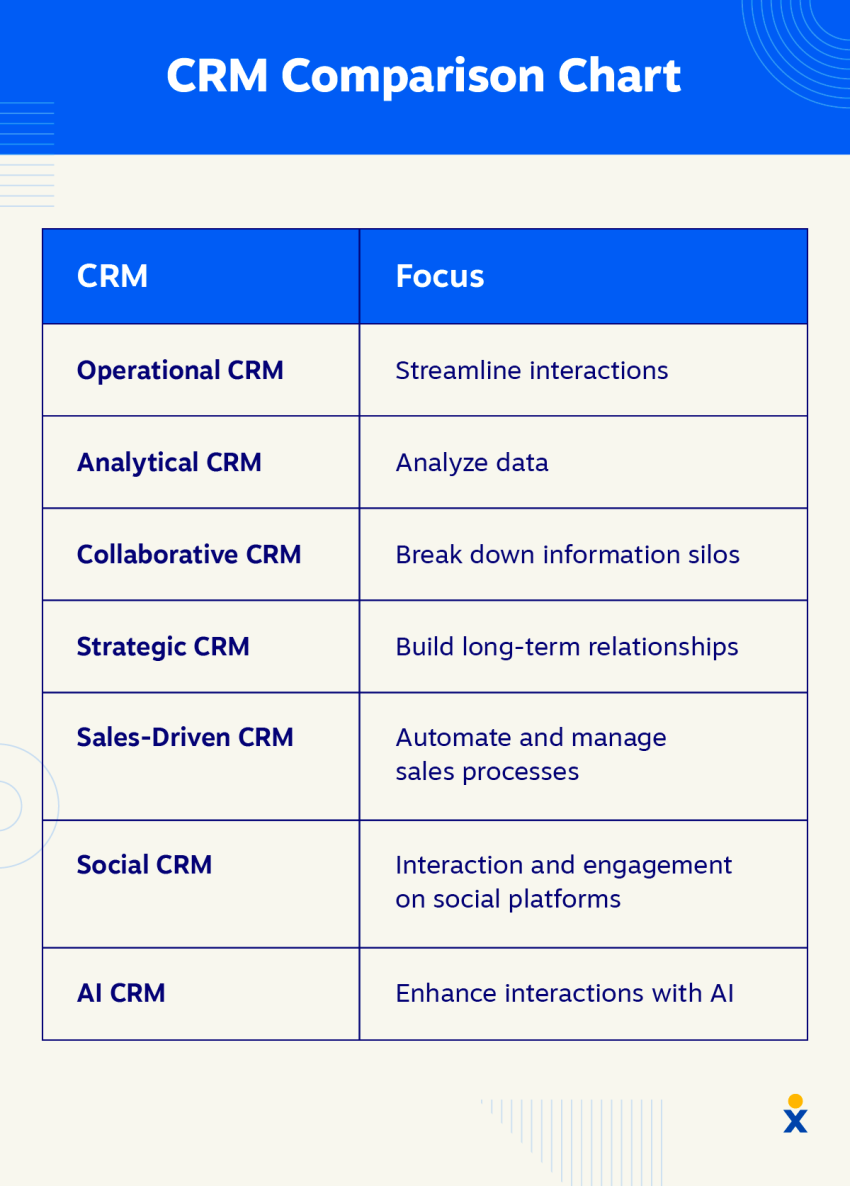
Credit: www.nextiva.com
What is CRM Software?
CRM software is a tool. It helps businesses manage their customers. It stores customer information like names, phone numbers, and emails. It also tracks sales and customer support. You can see all your customer data in one place. This helps you talk to customers better and faster.
Why Does Your Business Need CRM?
If you want to keep your customers happy, CRM is useful. It helps you remember important details about your customers. You can send them the right messages at the right time. It also helps your team work together. Everyone can see the same information. This stops confusion and mistakes.
Many small and big businesses use CRM software. It helps them stay organized and grow. If your business is growing, CRM can save you time and effort.
How to Choose the Right CRM Software?
Now, let’s talk about how to choose the right CRM. You want software that fits your business needs. Here are the important things to think about.
1. Understand Your Business Needs
First, know what your business needs from a CRM. Do you want to keep track of customers? Or do you want to manage sales and marketing? Maybe you want to improve customer support. Write down what is most important for your business.
For example, if you have a small business, you may want something simple. If you have a big business, you may need many features.
2. Check The Features
Look at the features each CRM offers. Some common features are:
- Contact management
- Sales tracking
- Marketing tools
- Customer support tools
- Reports and analytics
Choose a CRM with the features you need. If you need only contact management, don’t pay for extra features.
3. Easy To Use
Choose software that is easy to use. If it is hard, your team may not use it well. Look for simple designs and clear instructions. Some CRMs offer free trials. Use them to see if the software is easy for you.
4. Integration With Other Tools
Check if the CRM works with other tools you use. For example, email apps, calendars, or accounting software. Integration helps you save time. It stops you from entering the same data twice.
5. Pricing
Cost is important. Some CRM software is free. Others charge monthly or yearly fees. Look at your budget. Choose software that fits your budget but still has the features you need.
Remember, the cheapest option is not always the best. Sometimes paying a little more can save you time and effort.
6. Mobile Access
Many people work on the go. If your team uses phones or tablets, check if the CRM has a mobile app. Mobile access helps you update information anytime, anywhere.
7. Customer Support
Good customer support is important. If you have problems, you want help fast. Check if the CRM company offers support by phone, email, or chat. Some offer 24/7 help.
8. Security
Your customer data is important. Choose CRM software that keeps data safe. Look for software with strong security features. This keeps your business and customers protected.
Compare Popular CRM Software
To help you decide, here is a simple comparison table of some popular CRM options:
| CRM Software | Best For | Key Features | Pricing | Ease of Use |
|---|---|---|---|---|
| HubSpot CRM | Small to Medium Businesses | Contact management, email tracking, marketing tools | Free basic plan, paid upgrades | Very easy |
| Salesforce | Large Businesses, Custom Needs | Sales automation, analytics, integration | Starts around $25/month | Moderate |
| Zoho CRM | Small to Large Businesses | Lead management, workflow automation, mobile app | Free for 3 users, paid plans from $12/month | Easy |
| Pipedrive | Sales-focused Teams | Pipeline management, email integration | Starts at $15/month | Very easy |
Steps to Take Before Buying CRM Software
Follow these steps to make sure you pick the right CRM:
- List your business needs and goals.
- Research CRM options and compare features.
- Try free versions or demos.
- Ask your team for feedback.
- Check the pricing and budget.
- Look at customer reviews online.
- Contact the CRM company with questions.
Tips for Using CRM Effectively
Buying CRM is just the first step. To get the most from it, follow these tips:
- Train your team well on how to use it.
- Keep customer data up to date.
- Use reports to learn about your business.
- Customize the software for your needs.
- Use automation to save time.
- Keep improving your process over time.
Credit: softailed.com
Frequently Asked Questions
What Features Should I Look For In Crm Software?
Look for contact management, sales tracking, automation, and reporting tools in CRM software.
How Does Crm Software Improve Customer Relationships?
CRM stores customer data and helps personalize communication for better service and loyalty.
Can Crm Software Increase Sales For Small Businesses?
Yes, CRM helps track leads and manage sales pipelines, boosting small business sales.
Is Cloud-based Crm Better Than On-premise Crm?
Cloud CRM offers easier access, updates, and lower upfront costs than on-premise options.
Conclusion
Choosing the right CRM software can help your business grow. It makes managing customers easier. Remember to choose software that fits your needs, is easy to use, and fits your budget. Take your time to compare options. Test software before buying. This will help you find the best CRM for your business.
Good CRM software helps your business stay organized. It helps your team work better. It helps you keep customers happy. Use this guide to make a smart choice.


