
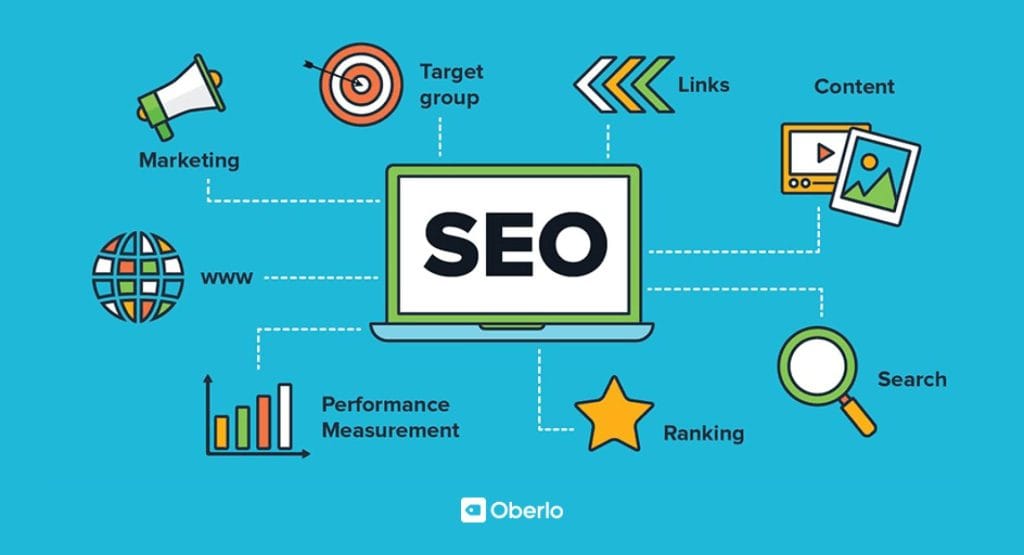
Are you ready to boost your website’s visibility without spending a dime? Finding the right SEO tools can feel overwhelming, especially when you’re just starting out.
But what if you could access powerful, free tools designed to help you climb search engine rankings with ease? You’ll discover the best SEO tools for beginners that won’t cost you anything. These tools will simplify your work, save you time, and give you the confidence to grow your online presence.
Keep reading—you’re about to unlock the secrets to smarter SEO!
Top Free Seo Tools For Beginners
Starting with SEO can feel hard. The right tools help make it easier. Free SEO tools give beginners a good start without cost. These tools cover key areas like keywords, backlinks, and website health.
Here are some top free SEO tools every beginner should know. They help improve your website step by step.
Keyword Research Tools
Keyword research tools show what words people search for. They help find terms with good traffic and low competition. Tools like Google Keyword Planner and Ubersuggest are great free options. Use them to choose keywords that match your content and audience.
On-page Seo Analyzers
On-page SEO analyzers check your website pages for SEO issues. They look at titles, headings, and content quality. Tools such as Screaming Frog SEO Spider or Seobility offer free scans. Fixing on-page errors improves your site’s chances in search results.
Backlink Checkers
Backlinks show how other sites link to yours. They are important for SEO trust. Free backlink checkers like Ahrefs Backlink Checker or Moz Link Explorer reveal your link profile. Use them to find strong links and spot bad ones to remove.
Rank Tracking Tools
Rank tracking tools monitor your website position in search results. They tell if your SEO efforts work. Tools like SERProbot and Google Search Console offer free rank tracking. Track keywords regularly to see progress and adjust strategy.
Website Audit Tools
Website audit tools scan your entire site for SEO health. They find broken links, slow pages, and mobile issues. Tools like Neil Patel’s Site Audit or Google PageSpeed Insights help identify problems. Fixing these issues improves user experience and SEO.
Choosing The Right Seo Tools
Choosing the right SEO tools is important for beginners. The right tool helps you learn SEO easily. It also saves time and avoids confusion. Many free tools offer useful features. But not all tools fit every user’s needs. Consider your goals and skills before picking a tool.
Ease Of Use
Tools should be simple to navigate. Beginners need clear menus and easy instructions. A clean design helps users find features fast. Avoid tools with complex setups or jargon. A tool that feels friendly makes learning fun.
Feature Set
Check what features the tool offers. Basic functions include keyword research, site audit, and rank tracking. Extra features like backlink analysis or content suggestions add value. Start with essential tools, then explore more as you grow.
Integration Options
Tools that connect with other apps save time. Look for integration with Google Analytics or Search Console. This helps gather data in one place. Integration also supports smoother workflows and easier reporting.
Support And Community
Good support helps beginners solve problems quickly. Look for tools with tutorials, guides, or live chat. A strong user community offers tips and advice. Learning from others speeds up skill building.
Using Keyword Research Tools Effectively
Using keyword research tools effectively helps beginners find the right words to target. These tools provide data on what people search for online. This information guides content creation and improves website traffic. Learning to use these tools well saves time and boosts SEO results.
Finding High-volume Keywords
High-volume keywords have many searches each month. These keywords bring more visitors to your site. Use free tools to discover these popular terms. Focus on keywords that match your content and audience. Avoid overly competitive keywords that are hard to rank for.
Long-tail Keyword Strategies
Long-tail keywords are longer and more specific phrases. They have lower search volume but higher conversion rates. Targeting these keywords helps attract visitors interested in exact topics. Use keyword tools to find related long-tail phrases. These keywords often face less competition and are easier to rank.
Analyzing Competitor Keywords
Studying competitor keywords reveals which terms work well for others. Use free tools to see which keywords bring traffic to similar sites. This insight helps choose effective keywords for your content. Avoid copying but learn from their keyword choices. Find gaps your competitors miss to stand out.
Credit: shakirazim.com
Improving On-page Seo With Free Tools
Improving on-page SEO is essential for any website. Free tools help beginners fix common SEO problems. These tools focus on key areas like titles, content, and mobile use. Using them makes your site easier to find and use. This section covers how free tools improve on-page SEO.
Optimizing Title Tags And Meta Descriptions
Title tags and meta descriptions tell search engines what your page is about. Free tools like Yoast SEO and Rank Math help check if titles and descriptions are the right length. They also suggest adding keywords to improve ranking. Clear and relevant titles attract more clicks from search results. Simple changes here can boost your visibility.
Checking Content Readability
Content must be easy to read and understand. Tools like Hemingway Editor and Grammarly highlight hard sentences and complex words. They suggest simpler alternatives to make text clear. Clear content keeps visitors on your page longer. This also helps search engines know your content is useful.
Enhancing Mobile Usability
Most users visit websites on mobile devices. Free tools like Google’s Mobile-Friendly Test show how well your site works on phones. They point out problems like small buttons or slow loading. Fixing these issues improves user experience and search rankings. A mobile-friendly site reaches more people easily.
Monitoring Backlinks For Better Authority
Monitoring backlinks is key for improving your website’s authority. Backlinks show search engines how trustworthy your site is. Not all backlinks are good. Some can hurt your rankings. Tracking backlinks helps keep your site healthy and strong.
Free SEO tools let beginners check backlinks easily. They provide data on link quality and source. This helps make smart decisions for your SEO strategy. Let’s explore ways to manage backlinks effectively.
Identifying Quality Backlinks
Quality backlinks come from trusted and relevant websites. They boost your site’s reputation and search rankings. Use free tools to find backlinks with high authority. Avoid links from spammy or unrelated sites. Focus on links that fit your niche. This creates a strong link profile.
Removing Toxic Links
Toxic links can harm your website’s authority. They come from bad neighborhoods or low-quality sites. Use backlink monitoring tools to spot harmful links quickly. Reach out to webmasters and ask for removal. If removal fails, disavow these links in Google Search Console. Keep your link profile clean and safe.
Building New Link Opportunities
Finding new backlinks helps grow your site’s authority. Use tools to see where competitors get their links. Look for websites related to your topic. Reach out with helpful content or guest posts. Creating valuable content attracts natural backlinks. Regularly build new links to stay competitive.
Credit: www.gumlet.com
Tracking Rankings Without Cost
Tracking your website’s search engine rankings helps measure SEO success. It shows how your pages perform for specific keywords. Free tools make rank tracking easy and accessible for beginners. You can monitor changes over time without spending money. This information guides your SEO efforts to improve visibility and traffic.
Setting Up Rank Tracking
Choose a free rank tracking tool like Google Search Console or Ubersuggest. Enter your website and target keywords to start monitoring. These tools update rankings regularly and send alerts on changes. Set up your account and connect your site for accurate data. Track important keywords that match your content and audience.
Interpreting Ranking Reports
Ranking reports show your position for each keyword on search engines. Look for trends like improvements or drops over time. Understand which pages rank well and which need work. Check impressions and clicks alongside rankings for better insight. Use simple graphs and charts to spot patterns easily.
Adjusting Strategies Based On Data
Use ranking data to improve your SEO plan. Focus on keywords that bring traffic but rank low. Update content or add new pages to target these keywords. Remove or fix pages with poor rankings and high bounce rates. Keep tracking regularly to see if changes help your site.
Conducting Website Audits With Free Tools
Conducting website audits is a key step in improving your site’s performance. Free SEO tools help beginners check their website easily. These tools scan your site and find areas that need fixing. Regular audits keep your site healthy and rank better on search engines. Using free tools saves money and still gives useful insights.
Finding Technical Seo Issues
Technical problems can stop search engines from reading your site. Free tools find issues like missing tags, duplicate content, and crawl errors. These tools show what to fix to improve your site’s structure. Fixing technical issues helps search engines understand your content better. It also improves your site’s chances to appear in search results.
Improving Site Speed
Site speed affects user experience and search rankings. Free tools measure how fast your pages load. They suggest simple fixes like compressing images or reducing scripts. Faster sites keep visitors longer and lower bounce rates. Speed improvements make your site easier to use on all devices.
Fixing Broken Links And Errors
Broken links hurt your site’s reputation and user experience. Free SEO tools scan your website for broken links and errors. These tools list all dead links to repair or remove. Fixing broken links keeps visitors engaged and helps search engines trust your site. Clean websites rank better and look more professional.
Credit: www.seo.com
Tips To Maximize Free Seo Tools
Using free SEO tools is a smart way to improve your website. These tools offer many features at no cost. To get the best results, use them wisely. Here are some tips to help you make the most of free SEO tools.
Combining Multiple Tools
No single tool can do everything. Each tool has its own strengths. Use a mix of tools for keyword research, site audit, and backlink checks. This gives a fuller picture of your SEO health. Combine data from different sources to spot more opportunities.
Regular Monitoring And Updates
SEO is not a one-time task. Check your website often with free tools. Track changes in rankings, traffic, and errors. Update your content and fix issues regularly. This keeps your site fresh and search-friendly.
Learning From Analytics
Free SEO tools provide valuable data. Study this information to understand your audience. See which pages get the most visits. Find out what keywords bring traffic. Use these insights to improve your content and strategy.
Frequently Asked Questions
What Are The Best Free Seo Tools For Beginners?
The best free SEO tools for beginners include Google Analytics, Google Search Console, Ubersuggest, and MozBar. These tools help analyze website traffic, track rankings, and optimize keywords effectively. They are user-friendly and perfect for those starting their SEO journey without a budget.
How Can Free Seo Tools Improve Website Ranking?
Free SEO tools help identify keywords, analyze competitors, and monitor backlinks. They provide insights into website performance and user behavior. Using these tools regularly improves content strategy and technical SEO, which boosts search engine rankings and organic traffic over time.
Are Free Seo Tools Enough For Beginner Optimization?
Yes, free SEO tools cover essential needs like keyword research, site audits, and performance tracking. They offer valuable data for beginners to optimize their websites effectively. However, as your site grows, consider premium tools for advanced features and deeper analysis.
Can Beginners Use Seo Tools Without Technical Skills?
Absolutely! Many free SEO tools offer simple interfaces and tutorials. They are designed for users with limited technical knowledge. Beginners can easily perform keyword research, track rankings, and monitor site health without complex setups or coding.
Conclusion
Choosing the right SEO tools helps beginners grow their websites. Free tools offer useful features without any cost. They help track keywords, analyze traffic, and improve rankings. Starting with simple tools builds confidence and skills. Consistent effort with these tools shows steady progress.
Explore each tool to find what suits you best. Keep learning and applying SEO basics regularly. Success comes from patience and practice, not quick fixes. Use these tools as guides on your SEO journey. Your website will improve step by step, day by day.


